Rolling out warehouse management on an AuctionWorx site
The setup order, from employees and racks to pickup appointments and delivery confirmation.
15+ years on AuctionWorx · RainWorx Premium Partner
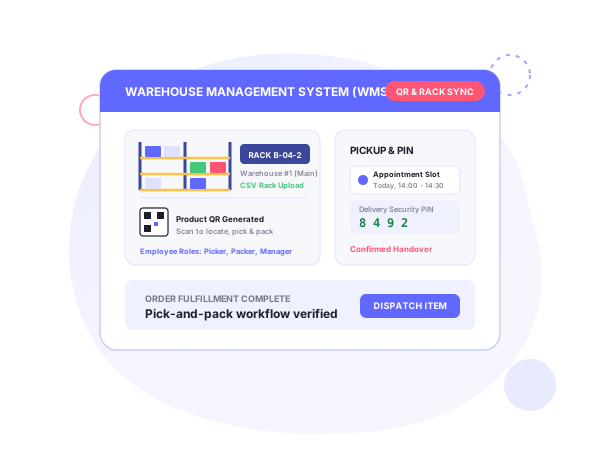
Warehouse management extends AuctionWorx past bidding into storage, pickup and delivery. This guide covers an AuctionWorx warehouse management rollout. The product page is Warehouse Management for AuctionWorx. The same system is also called WHMSPro; see WHMSPro.
Systenics documents the setup as eleven steps, each with a video walkthrough. They go in this order.
Employees, warehouses and racks
- Employees. Sellers create employee accounts, assign roles and control access with Employee Management.
- Warehouse. Add a warehouse location. You can create and manage several.
- Racks. Download the rack template, fill in your rack data and upload it as a CSV. Racks can also be relocated later using QR codes.
Inventory and QR labels
- Inventory. Add missing inventory, or have inventory generated automatically for new listings. Then assign items to racks using QR codes.
- Product QR codes. Generate and print QR labels, assign them to inventory items and map products to rack locations by scanning.
- Rack assignment. Scan the Rack QR code, or enter the rack path by hand.
Appointments
- Appointment templates. Create reusable templates and generate booking slots for buyers. The calendar shows high and low traffic periods.
- Booking. The buyer selects invoices, picks a date and time slot, confirms, and can add the appointment to their calendar.
Packaging and delivery
- Invoice packaging. Staff pick the invoice items, handle retained or skipped items, and can assign new rack locations during packaging.
- Delivery appointment. Staff attend the appointment, verify payments, assign dispatchers and confirm delivery with Delivery PIN verification.
- Final delivery. The buyer verifies the booking, reviews the package and confirms with a secure Delivery PIN.
The mobile app lists warehouse management integration as an optional add-on. If your site needs to move to a newer release first, see the upgrade and migration service.
What else it covers
Beyond the eleven steps, The product also includes these capabilities:
- Unified system: AuctionWorx extended from bidding into inventory, warehouse flow and logistics in one place.
- Employee management: warehouse staff with defined roles and permissions.
- Smart inventory and QR labels: products and racks labeled with QR codes and mapped for accurate tracking and fast picking.
- Calendar appointment booking: buyers book time slots, with visibility into high and low traffic periods.
- Packaging and delivery: staff pick, pack and dispatch orders, with PIN-verified delivery confirmation.
The walkthrough videos cover the same ground, including relocating inventory using QR codes and packaging invoices that have skipped items.
Systenics’ customization guide describes WHMSPro as synchronizing lot intake, bin and rack mapping, buyer pickup appointment scheduling and automated carrier label generation with FedEx, UPS and DHL. It also adds batch QR code printing and parcel label generation in a unified dashboard. Its blog on auction warehouses goes further into the operating model: mobile lot intake with a scanned barcode or a generated lot QR sticker, a hierarchy of warehouse, zone, aisle, rack, shelf and bin, self-service pickup scheduling after an invoice is paid, and carrier rate comparison. Read those as the wider design intent of the system. The eleven steps above are the core workflow.
Who it’s for
Auction warehouses hold one-off lots that exist for a single auction cycle, not thousands of units of one SKU, and most buyers collect locally in a short window after the sale. That is the problem Systenics builds for. Its industry pages name:
- eCommerce overstock, box-damaged and returned items: real-time stock location, optimized picking and packing, QR-managed deliveries, and multiple warehouses or fulfilment centers. See liquidation auctions.
- Estate sales: tracking every item from intake to delivery with QR-based inventory management, multi-location support and pick-and-pack workflows. See estate sales.
- Weekly estate sales, commercial vehicle auctions and liquidation surplus, per the warehouse blog. See vehicle auctions.
Fit at a glance
| Item | Details |
|---|---|
| Also called | WHMSPro |
| Setup path | Employees, warehouse, racks (CSV), inventory, QR labels, rack assignment, appointments, packaging, delivery |
| Rack loading | Bulk CSV upload from a downloadable template |
| Labels | Product and rack QR codes; scanning or manual rack path entry |
| Pickup | Reusable appointment templates, buyer slot booking, calendar add |
| Delivery check | Delivery PIN on both the staff and buyer side |
| Mobile app | Optional add-on (“Warehouse Management integration”) |
| Barcode intake | Scan an incoming manufacturer barcode at intake |
Pairing with other products
The mobile app lists warehouse management integration as an add-on, next to delivery management and pickup scheduling. See the mobile app guide. The barcode listing add-on is the intake-side companion: its scanning workflow suits high-volume warehouses, and incoming barcodes can be scanned at intake. See barcode listing creation.
Pricing and terms
Pricing for warehouse management is on request: book a discovery call for a quote. Systenics’ general terms apply: one-time purchase, deployment on your AuctionWorx installation included, no subscriptions or per-listing fees, and AuctionWorx licenses sold separately by RainWorx.
Related use cases: liquidation auctions, estate sales and vehicle auctions.
Frequently asked questions
Ready to build on AuctionWorx?
Book a call or send us your project details, and we'll get back to you with next steps.
