Configuring the Dutch Auction engine in AuctionWorx
The pricing rules, schedule windows and templates you set up once and apply to listings.
15+ years on AuctionWorx · RainWorx Premium Partner
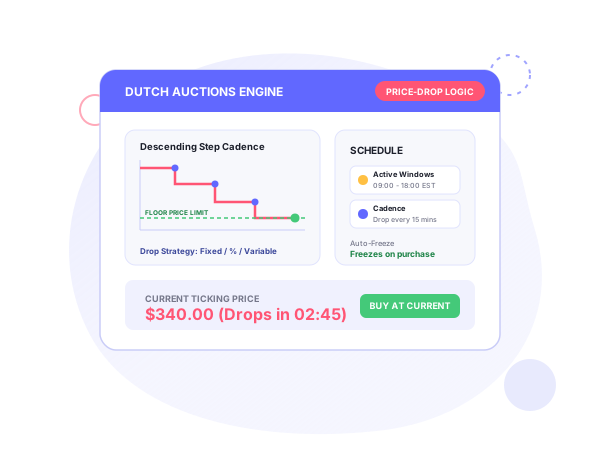
A Dutch auction starts at a high price and lowers it on a schedule until a buyer accepts. In AuctionWorx that is done by an add-on engine, described at Dutch Auctions engine for AuctionWorx. This guide covers AuctionWorx Dutch auction template setup: the settings, in the order you decide them.
Ascending versus descending
A standard auction starts low and rises as bidders compete, so an item can end unsold if nobody bids, and stock sits on the shelf while warehouse costs pile up. A Dutch auction starts high and drops in automated steps. The sale happens when a buyer accepts the current price, and the price freezes at that point. There is no waiting for an auction end.
Discount strategies
You pick one of three:
- Fixed Amount: the price falls by the same amount each step.
- Percentage: the price falls by a percentage each step.
- Variable
Floor price and interval
The floor price is the lowest the price can go, so you never sell below your minimum. You define the drop amount and the drop interval once, and the engine lowers the price at that cadence until a buyer accepts or the floor is reached. The figures on Systenics’ example screens (a $50 drop every 60 minutes, for instance) are illustrations, not defaults.
Schedule and recurrence
Set a start date and end date, one or more time ranges within a day, and Daily or Weekly recurrence. Prices drop only during the active time windows. Systenics’ example uses three windows in one day (8:00 to 9:00 AM, 12:00 to 3:00 PM and 5:00 to 7:00 PM) across a date range of a few days. It gives Friday flash sales and daily clearance windows as uses.
Templates
A template stores the strategy, floor, drop and schedule. At listing creation you set the listing feature type to Dutch Auction, select the template (Systenics’ screen shows one named “DA 01 Template”), and the rules apply. One template can serve any number of listings, so a team keeps pricing consistent without re-entry or reconfiguration.
What buyers see
The listing shows the current price, a countdown to the next drop and the floor price. One click on “Accept Current Price” completes the purchase. There is no bidding and no outbid state. The engine also supports multi-quantity checkout.
Who it’s for
Systenics names four settings:
- Overstock and returns: surplus, box-damaged and returned items, cleared with automated price drops. See liquidation auctions.
- Estate sales: large inventories moved with timed price reductions. See estate sales.
- Antiques and collectibles: rare items with descending prices that reward decisive collectors. See antiques and collectibles.
- eCommerce liquidation: daily or weekly clearance sales on a schedule.
Its customization guide adds wholesale volume sales and perishable goods liquidation, where sellers cannot wait days for a timer to wind down.
Fit at a glance
| Item | Details |
|---|---|
| What it is | Add-on engine for AuctionWorx with automated pricing, scheduling and reusable templates |
| Discount strategies | Fixed Amount, Percentage, Variable |
| Price controls | Floor price, drop amount, drop interval |
| Schedule | Date range, multiple daily time windows, Daily or Weekly recurrence |
| Reuse | Templates selected at listing creation |
| Buyer action | Accept Current Price, one click |
| Checkout | Multi-quantity checkout support |
Pricing and terms
Pricing for the Dutch engine is on request: book a discovery call for a quote. Systenics’ general terms apply: one-time purchase with deployment on your AuctionWorx installation included, no subscriptions and no per-listing fees. AuctionWorx licenses are sold separately by RainWorx. Custom bidding models, Dutch auctions included, also appear in Systenics’ custom development services for Enterprise and Events editions, which follow a discovery call, ballpark estimate, mockups and milestone delivery. For changes to your own listing pages, see the customization service.
Frequently asked questions
Ready to build on AuctionWorx?
Book a call or send us your project details, and we'll get back to you with next steps.
