How barcode-to-listing works in AuctionWorx
What a scan fills in, how staff scan, and where it runs.
15+ years on AuctionWorx · RainWorx Premium Partner
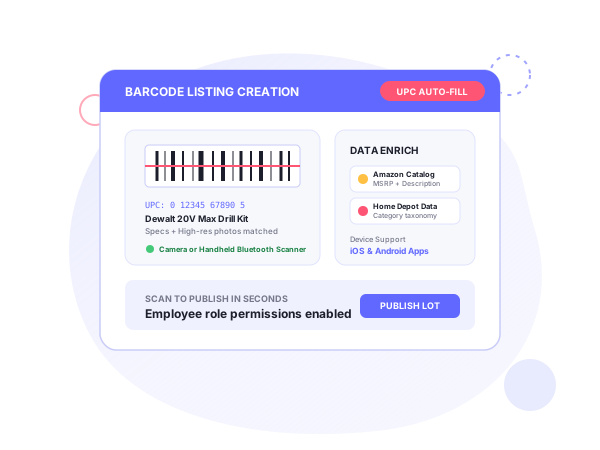
In AuctionWorx, barcode-to-listing means a scan creates the listing: scan a product barcode and the app returns a draft, so nobody types product data by hand. It is built for warehouses, liquidation sellers and resellers who create many listings from physical stock. The product page is eCommerce listing creation via barcode for AuctionWorx; it starts from $2,799 (one-time, see systenics.com).
What a scan fills in
The app looks up the UPC on Amazon and Home Depot and fills the listing with the title, description, category, UPC and product images. The images come across automatically, so there is no separate photo upload.
The data describes the product as sold retail. Your item may be a return or a box-damaged unit, so the flow is scan, review the auto-filled details, then publish. Systenics quotes 80%+ faster listing creation, which is its own figure.
Scanning
Staff scan with the phone or tablet camera or with a handheld barcode scanner. Both work for sellers creating their own listings and for employees listing on behalf of the business.
Where it runs
It runs in the mobile app on Android and iOS. The purchase includes the Buyer+Seller mobile app with barcode scanning, so the app setup applies: your branding, store accounts and keys. The mobile app guide lists them.
The lookup uses a barcode lookup service. Per the mobile terms, heavy use may mean paying for a higher plan with that provider.
Editions
AuctionWorx Enterprise and Events Edition. The app is supported on the latest AuctionWorx release at the time of purchase; the upgrade and migration service can bring an older site up to it.
Step by step
- Open the app as a seller or an employee and choose to create a listing.
- Scan the UPC with the camera or a handheld scanner. Systenics’ demo shows product images, specs and retail prices coming into the listing.
- Check what came back: title, description, category, UPC and images.
- Adjust anything that does not match the actual item, such as its condition.
- Publish. Systenics describes going from item intake to a live listing in seconds.
Its customization guide adds that intake teams can scan manufacturer UPC or EAN barcodes to populate specifications, retail values and item photos, and that vehicle VINs go through a separate ChromeData integration.
Who it’s for
Systenics names high-volume warehouses, liquidation sellers, resellers and any business handling large quantities of inventory. It gives returns, overstock and box-damaged items as examples of what to process this way. See liquidation auctions.
Fit at a glance
| Item | Details |
|---|---|
| Editions | AuctionWorx Enterprise and Events Edition |
| Platforms | Android and iOS |
| Users | Sellers and employees |
| Data source | Amazon and Home Depot, by UPC |
| Fills in | Title, description, category, UPC, product images |
| Mobile app tier | Buyer + Seller app included with the purchase |
| Related add-ons | AI descriptions (Buyer + Seller Pro app), warehouse management integration |
How it pairs with other products
- Mobile app: the purchase includes the Buyer+Seller app with barcode scanning. The mobile app also lists UPC barcode integration as an optional add-on. See the mobile app guide.
- AI descriptions: for returns and overstock, scan first and let the AI refine the copy. See AI listing descriptions. That add-on includes the Buyer+Seller Pro app, while this one includes the Buyer+Seller app.
- Warehouse management: the warehouse blog describes scanning an incoming manufacturer barcode at mobile intake. See warehouse management.
Pricing and terms
The price is $2,799, one time. It is for AuctionWorx Enterprise or Events Edition, and it includes the Buyer+Seller mobile app, barcode scanning from Amazon and Home Depot, auto-populated title, description and images, and Android and iOS support. Systenics’ pricing page states that published add-on prices include deployment on your AuctionWorx installation, with no subscriptions or per-listing fees, and that AuctionWorx licenses are sold separately by RainWorx.
Because the price includes the Buyer+Seller app, the mobile terms apply: the app is supported only on the latest RainWorx AuctionWorx release at the time of purchase, there is free email support for bug fixes reported in the first 30 days, and there are no annual maintenance fees. Google and Apple OS compatibility updates every one to two years are chargeable, typically $500 to $1,000.
Related use case: liquidation auctions.
Frequently asked questions
Ready to build on AuctionWorx?
Book a call or send us your project details, and we'll get back to you with next steps.
